
(*1) WebUI (Web User Interface) refers to a user interface that can be operated through a web browser.
(*2) As of March 10, 2025, based on our research.
(*3) Notice of revision to basic pricing: https://www.conoha.jp/ai/canvas/news/?btn_id=ai-canvas--banner_ai-news&ap=2015053749
[About “ComfyUI”]
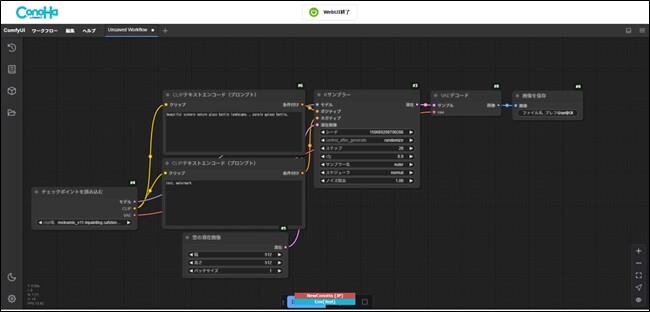
“ComfyUI” is a visual GUI (*4) tool that allows users to easily operate “Stable Diffusion.” It features an interface where each function required for image generation is represented as a block called a “node,” and these blocks are visually arranged and connected with lines. This makes it possible to organize complex image generation processes visually and execute settings and generation intuitively.
Normally, using “ComfyUI” requires downloading it from GitHub (*5) to your own PC and performing installation and setup. However, with “ConoHa AI Canvas,” it can be used easily through a web browser without any installation.
(*4) A GUI (Graphical User Interface) tool is software that provides a visually operable user interface.
(*5) GitHub is a cloud-based platform for source code management and sharing used in software development.
■Image of the “ComfyUI” interface on “ConoHa AI Canvas”
[Background of Providing “ComfyUI”]
Since its release on August 1, 2024, “ConoHa AI Canvas” has adopted “AUTOMATIC1111” (*6) as its WebUI, providing an environment where anyone can easily enjoy image generation without installation, using only a web browser. On the other hand, the use of “ComfyUI” has been rapidly expanding due to its quick support for the latest technologies and its ability to easily share settings. In response to these needs, “ConoHa AI Canvas” now supports “ComfyUI” in addition to “AUTOMATIC1111,” allowing users—from beginners to advanced users—to choose the most suitable WebUI and enjoy a more convenient AI image generation experience.
(*6) The name of a project that provides a WebUI for operating “Stable Diffusion.”
■Differences between ComfyUI and AUTOMATIC1111
| ・Minimal buttons ・Simple layout with panels only ・Functions can be freely arranged as nodes | ・Rich set of buttons and panels ・Functions are built into the UI by default | |
| ・Node-based ・No-code tool where users arrange elements themselves ・Custom workflows can be saved and loaded | ・Hierarchical UI ・Explorer-like interface ・Once button locations are learned, operations can be repeated consistently | |
| ・Users can build their own workflows ・Highly flexible customization ・Fine control over the entire generation process | ・Comprehensive standard features | |
| ・Intermediate to advanced users ・Engineers and creators | ・Beginner to intermediate users ・Those new to image generation AI using “Stable Diffusion” | |
| Available | Available | |
| 6.6 yen/minute (Separate basic fee for “ConoHa AI Canvas” applies) | 6.6 yen/minute (Separate basic fee for “ConoHa AI Canvas” applies) |
[Start Date of “ComfyUI” Availability]
Scheduled for around 17:00 on Thursday, March 13, 2025.
*Once available, it will be announced on the ConoHa AI Canvas webpage and the official X (formerly Twitter) account of “ConoHa by GMO” (URL: https://x.com/ConoHaPR
).
[Overview of “ConoHa AI Canvas”]
(URL: https://www.conoha.jp/ai/canvas/ )
“ConoHa AI Canvas” is an AI image generation service that allows users to easily use Stability AI’s image generation AI “Stable Diffusion XL” directly from a web browser. While using “Stable Diffusion XL” typically requires specialized knowledge and a high-performance PC environment, this service enables anyone to generate high-quality images with simple operations through a browser on their own PC. On March 1, 2025, the pricing plans were revised, significantly extending the usage time available under the base fee, making the service even more affordable.
■Key Features
1. Easy to use directly from a web browser
・Anyone can easily generate high-quality images with simple operations via a browser on their own PC.
・Supports Japanese language display.
・Generated images can be saved and managed in the cloud-based file storage “File Manager.”
Enables secure, large-scale image generation and storage without consuming local PC storage capacity.
How to Use: [AI Canvas for Beginners] Learn how to generate images in this video!
https://youtu.be/zgFNamhX_w8?si=I8ym8NuKPO48-ByP
[Official ConoHa Channel]
https://www.youtube.com/@ConohaJp
2. High-quality image generation with “Stable Diffusion XL”
・Uses “Stable Diffusion XL,” an advanced image generation model developed by Stability AI.
・Selected for the Good Design Best 100 in 2023, making it a highly acclaimed AI image generation model.
Reference:
https://ja.stability.ai/blog/gooddesign100
3. Enjoy unlimited image generation with no restrictions
・No limitations on the number of images generated or artistic styles, allowing full customization.
・Generate images as many times as you like with no usage limits.
■Pricing (New pricing effective from March 1, 2025)
| Plan Name | Entry | Standard | Advanced |
| Base Fee (Monthly, tax included) | 1,100 yen | 4,378 yen | 9,878 yen |
| Free WebUI Usage Time | 10 hours | 50 hours | 100 hours |
| WebUI Usage Fee(*7) | 6.6 yen/min | 6.6 yen/min | 6.6 yen/min |
| Storage | 30GB | 100GB | 500GB |
(*7) The pricing for “ConoHa AI Canvas” consists of the sum of:
① Base Fee (monthly): A fixed monthly fee is required to use the service.
② WebUI Usage Fee (per minute): Usage of the “Stable Diffusion” WebUI for AI image generation is charged on a per-minute basis.
However, each plan includes a free usage allowance. The free allowance resets monthly, and no WebUI usage fee is charged within the free usage limit each month.
[About “ConoHa by GMO”]
(URL: https://www.conoha.jp/ )
“ConoHa by GMO” is a hosting service provided by GMO Internet Group, Inc., which boasts the No.1 hosting market share in Japan (*8). It offers a range of services tailored to customers’ needs, including “ConoHa WING,” Japan’s fastest (*9) rental server ideal for blogs and website creation; “ConoHa VPS,” which allows greater flexibility in server customization and configuration; “ConoHa for Windows” for users who require a Windows OS; and “ConoHa for GAME” for gamers with free game templates.
With no initial cost and a strong focus on simplicity and ease of use, the service is designed for a wide range of users—from first-time server users to individual business owners and enterprises.
(*8) Market share in the industry is calculated based on data from ipinfo.io, a website operated by IDB LLC that provides geographic information associated with IP addresses.
(*9) As of February 2025, based on our research. Among the top 10 services accounting for over 90% of the market share in Japan, the average server processing speed of each service’s lowest-tier plan was measured five times using load testing tools “Apache Bench” and “h2load,” and the results were compared. Market share in Japan is calculated based on data from Webhosting.info and DomainTools.